What 'Phone Storage' Actually Means
When a phone is advertised as having 128 GB of storage, that number describes how much data the device can hold - think of it as a built-in filing cabinet. But that cabinet is already partially full the moment you turn the phone on. The operating system (iOS or Android), pre-installed manufacturer apps, and essential system files typically consume between 10 and 20 GB right out of the box.
What's left is your usable space - and it shrinks further as your phone receives software updates over its lifespan. Understanding this gap between advertised and available storage is the first step to making a smarter decision about which storage tier is worth paying for.
Storage is separate from RAM. RAM handles what your phone is actively doing right now; storage is where everything else lives permanently. Confusing the two is common, and it can lead people to buy more of one while underestimating their need for the other. If you're evaluating a new device, the phone buying checklist covers both specs in a practical framework.
The Biggest Culprits Behind a Full Phone
Most people are surprised to learn that they never directly chose to fill their phone - it happened gradually, driven by a handful of consistent categories.
10-20 GB
Storage consumed by the OS before you add anything
Operating system files and pre-installed apps claim this space on most modern smartphones at first boot.
400+ MB
Size of one minute of 4K smartphone video
File sizes vary by resolution, frame rate, and codec, but high-quality video remains the fastest way to fill phone storage.
3-8 MB
Average size of a single high-res smartphone photo
Shooting in RAW format or with high megapixel sensors can push individual image files significantly larger.
Photos and Videos
This is typically the single largest personal category. A modern smartphone camera shoots high-resolution images that can run 3-8 MB each, and video files are far larger - a minute of 4K footage can exceed 400 MB. If you leave the camera on its highest-quality default settings and never offload files, your photo library can consume dozens of gigabytes within a year.
Apps and Their Hidden Data
Apps themselves vary widely in size, but what often goes unnoticed is the data they store locally. Social media, navigation, and streaming apps accumulate cache files - temporary data meant to speed up your experience. A single navigation app can quietly store several gigabytes of offline map data. A streaming service might cache downloaded shows you've already watched. None of this requires your approval.
System Updates and Temporary Files
Every major operating system update requires temporary working space during installation, sometimes 5-10 GB. These files are usually cleaned up afterward, but during the process your phone may appear critically full. Smaller residual files from interrupted downloads and old update packages can also linger.
Check Storage Usage Before You Delete
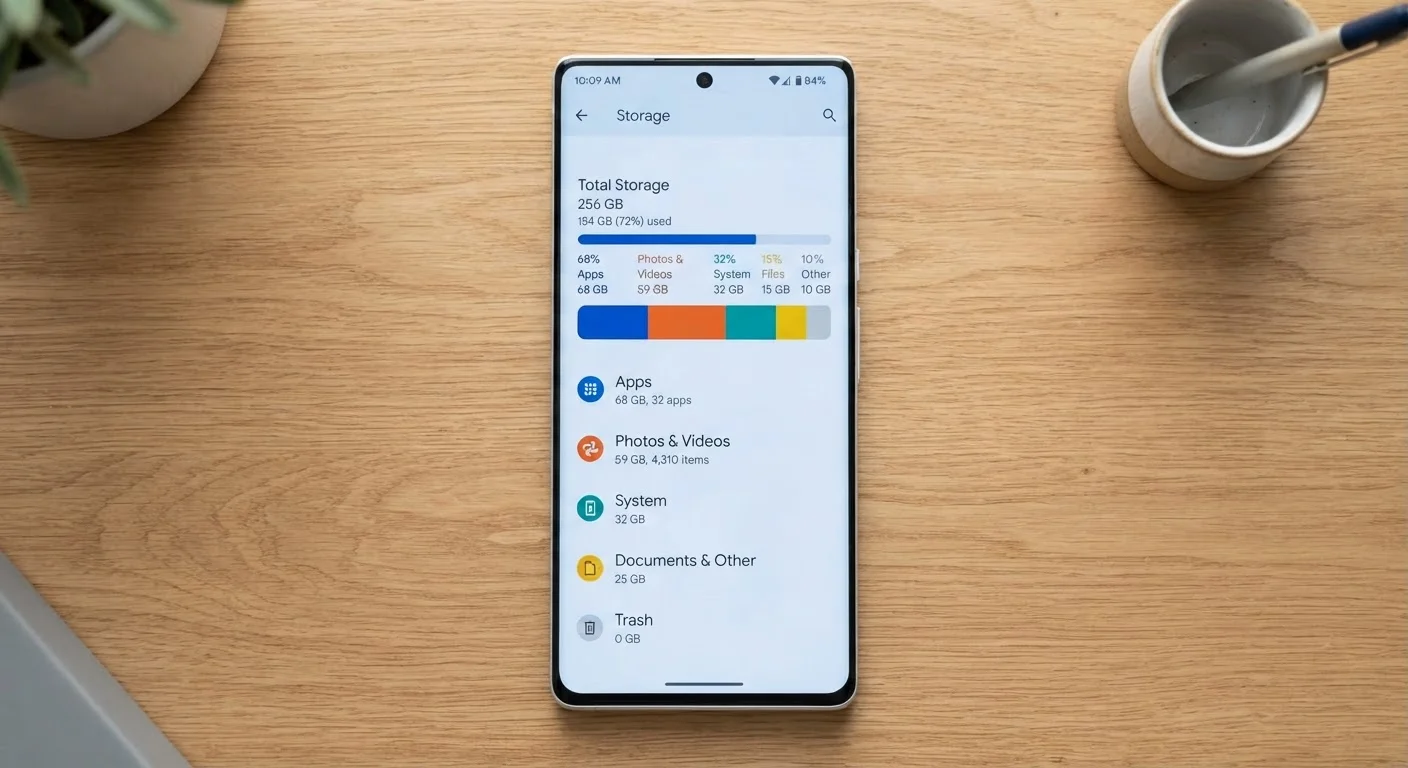
Both iOS and Android include a built-in storage breakdown in settings that shows exactly how much space each category - apps, photos, system - is using. Checking this first takes 30 seconds and tells you precisely where to focus your cleanup effort rather than guessing.
How Much Storage You Actually Need
There's no universal answer, but there are practical benchmarks based on usage patterns.
- 64 GB: Increasingly insufficient for most people. Suitable only for minimal app use and someone who actively manages their media library and relies heavily on cloud storage.
- 128 GB: A solid baseline for average users - moderate photo-taking, a typical mix of apps, and some offline media. This tier handles most households comfortably without constant management.
- 256 GB: Recommended for frequent photographers, anyone who shoots a lot of video, travelers who download offline content, or users who prefer to store music and podcasts locally.
- 512 GB and up: Primarily for power users, mobile professionals, or anyone who uses their phone as their main camera and content-creation device.
One often-overlooked consideration: camera specs directly affect how quickly storage fills. Higher megapixel counts and formats like RAW produce much larger files. The relationship between camera specs and file size is worth understanding before you commit to a storage tier.
Managing Storage Before It Becomes a Problem
Good storage habits prevent the scramble of deleting things under pressure when your phone hits capacity.
Cloud Storage Has Real Limits
Free cloud storage tiers - typically 5 to 15 GB depending on the platform - fill up quickly if photos and videos are being backed up automatically. Once the free tier is full, automatic backups stop unless you pay for more space. Factor potential subscription costs into your overall device budget if you plan to rely on cloud offloading as a primary storage strategy.
Review your photo library periodically. Duplicate shots, blurry images, and screenshots accumulate quickly. A single clean-up session can recover several gigabytes. Many operating systems now offer tools to identify duplicates automatically.
Audit your app list. Check which apps you haven't opened in the past month. App data often survives in the background long after you've stopped using the app itself. Removing unused apps eliminates both the app size and its accumulated local data.
Use cloud backup as an offloading strategy, not just a safety net. Services that back up photos and allow you to delete local copies can dramatically extend effective storage. The tradeoff is dependence on internet access and, usually, a subscription cost beyond free tiers.
Think of storage as infrastructure. Like buying a home with enough closets, the right amount of storage is one you rarely think about. Underbuying forces constant management; overbuying has a one-time upfront cost. If you plan to keep your phone for three or more years - which is increasingly common - consider how your usage might grow, not just where it stands today. This connects to a broader habit of evaluating device needs before purchase, which the smart device checklist addresses for any electronics purchase.